
The "just use Postgres for everything" crowd gets more ammunition with every release, and Postgres 19 hands them a big one: graph queries in core, using standard SQL syntax, over the tables you already have. That is the headline, but it is not the only thing in this release worth clearing your afternoon for. There is a new upsert form that finally makes "get or create" a single atomic statement, and a REPACK command that gives disk space back to the operating system without locking the table for the whole rewrite.
Beta 1 landed on June 4, 2026, beta 2 followed on July 16, and beta 3 arrived in August, with the final release expected around September or October 2026. Treat the feature list as provisional until the release candidate. GROUP BY ALL shipped in beta 1 and was reverted on July 17, one day after beta 2 came out. That makes right now the good moment to pull the newest beta down and find out what breaks, before the upgrade lands on you in production.
What is new in Postgres 19?
Three features carry the release. SQL/PGQ property graphs let you query relational tables as a graph without moving any data. ON CONFLICT DO SELECT closes a gap that has been open since upserts arrived in Postgres 9.5. REPACK absorbs both VACUUM FULL and CLUSTER into one command and adds a concurrent mode that keeps the table readable and writable while it works.
Behind those, a set of smaller changes will still show up in your day: planner hints through the new pg_plan_advice module, JIT compilation disabled by default, autovacuum that can run parallel workers, and COPY TO that writes JSON directly.
How do graph queries work in Postgres 19?
Take a normal SaaS permission model. You have users, teams, and projects, plus two join tables wiring them together: team_members connects a user to a team, and team_projects connects a team to a project. Nothing exotic, and probably close to something already in your schema.
Now answer a question a support engineer asks ten times a week: which projects can a given person actually reach? In plain SQL that is a chain of four joins across five tables.
SELECT p.name
FROM users u
JOIN team_members tm ON tm.user_id = u.id
JOIN teams t ON t.id = tm.team_id
JOIN team_projects tp ON tp.team_id = t.id
JOIN projects p ON p.id = tp.project_id
WHERE u.email = '[email protected]';
This is not hard to write. It is just noisy, and the noise scales badly. Add "and only if the team grant has not expired" plus "and the project is not archived" plus one more hop through an organization table, and you are reading a wall of join conditions to work out a path that a person would describe in one sentence.
Postgres 19 lets you declare that path once. The command is CREATE PROPERTY GRAPH, and it names which tables hold the things and which tables hold the connections between them.
CREATE PROPERTY GRAPH access_map
    VERTEX TABLES (
        users LABEL person,
        teams LABEL team,
        projects LABEL project
    )
    EDGE TABLES (
        team_members SOURCE users DESTINATION teams LABEL member_of,
        team_projects SOURCE teams DESTINATION projects LABEL grants_access
    );
The vertex tables are the ones holding real data, so users, teams, and projects. The edge tables are the join tables, and each one declares its direction: team_members runs from a user to a team, team_projects runs from a team to a project. The LABEL clauses are optional names you use later in the pattern, which is handy because "person" reads better than "users" inside a query about who can see what.
This short form works when the tables already have primary keys and foreign keys, which is the normal case. When they do not, the verbose form spells the keys out explicitly with KEY, SOURCE KEY ... REFERENCES, and DESTINATION KEY ... REFERENCES, and you will need it for any join table missing its constraints.
With the graph declared, the same question becomes a pattern that reads like the sentence the support engineer said out loud.
SELECT project_name
FROM GRAPH_TABLE (access_map
    MATCH (u IS person WHERE u.email = '[email protected]')
          -[IS member_of]-> (t IS team)
          -[IS grants_access]-> (p IS project)
    COLUMNS (p.name AS project_name)
);
Read it left to right: start at a person with that email, walk the member_of edge to a team, walk the grants_access edge to a project, then return the project name. The COLUMNS clause is where you pick what comes back, and you can pull attributes from any element bound in the pattern, so adding t.name AS team_name next to it costs you five characters instead of another join.
GRAPH_TABLE returns a normal relation, which is the part that makes this genuinely usable rather than a separate world. You can join its output against ordinary tables, filter it, aggregate it, or drop it into a CTE. Graph and relational queries mix freely in one statement because they run through the same planner and executor.
CREATE PROPERTY GRAPH creates no new tables, copies no data, and changes nothing about your existing schema. The documentation describes a property graph as a kind of read-only view over relational tables, so the data stays exactly where it is and the graph is only a lens you look through. Dropping the graph is free and reversible, which makes this a cheap thing to experiment with on a real database.
Is Postgres 19 a replacement for Neo4j?
No, and the difference decides whether this feature helps you. A native graph database stores data in a graph structure. That physical layout is what makes deep traversals fast: following the tenth hop costs roughly what the first one did, because the engine walks pointers rather than probing indexes. Postgres 19 stores nothing new. Underneath the pattern syntax, your query is still resolved against relational tables with the usual join strategies, because the graph is a view rather than a storage format.
So if you were reaching for a graph database because you need traversal performance over deep or highly connected data, recommendation engines, fraud rings, network topology, then a dedicated engine is still the right tool. If you were reaching for one because writing a ten table join in SQL is miserable and you wanted the query to be readable, Postgres 19 gives you exactly that, without a second datastore to run, back up, and keep in sync. That is a narrower promise than the headlines suggest, and it is still a very good deal for most teams.
How to do an atomic get or create with ON CONFLICT DO SELECT
Every codebase has this pattern somewhere: insert a row if it does not exist, and either way hand the row back. Tags, accounts, idempotency keys, external identifiers, it is the same shape every time.
Until now, Postgres could not do this in one statement. ON CONFLICT DO NOTHING returns nothing when the row already exists, so RETURNING gives you an empty result and you follow up with a SELECT.
-- Two statements, and a gap between them
INSERT INTO tags (name) VALUES ('postgres')
ON CONFLICT (name) DO NOTHING
RETURNING *;

SELECT * FROM tags WHERE name = 'postgres';
Two statements means a window between them, and the usual dodge was ON CONFLICT (name) DO UPDATE SET name = EXCLUDED.name, a write that exists purely to force a row out of RETURNING. That burns a dead tuple and bumps xmax on every single call, for nothing.
Postgres 19 gives the operation its own form.
INSERT INTO tags (name) VALUES ('postgres')
ON CONFLICT (name) DO SELECT
RETURNING *;
One statement, so the outcome is atomic: either the row is inserted and returned, or the conflicting row is selected and returned. The documentation calls this an idempotent insert, or get or create. Two rules come with it. A conflict target is mandatory, so you must name the column or constraint, and RETURNING is mandatory too, which makes sense because a DO SELECT with nothing to return would be a no-op.
When you plan to modify the row you just fetched, take the lock in the same statement.
INSERT INTO accounts (external_id, balance_cents)
VALUES ('acct_9f31', 0)
ON CONFLICT (external_id) DO SELECT FOR UPDATE
RETURNING id, balance_cents;
DO SELECT accepts the full set of locking clauses, so FOR UPDATE, FOR NO KEY UPDATE, FOR SHARE, and FOR KEY SHARE all work. The conflicting row comes back already locked against concurrent updates, which removes the classic sequence of select, then lock, then discover someone changed it underneath you. There is also an optional WHERE clause, so you can return the existing row only when it differs from what you tried to insert.
In Rails this replaces one of the most quietly broken helpers in the framework. find_or_create_by runs a SELECT and then an INSERT as separate statements, so two requests arriving together can both miss the select and race into the insert, and one of them eats a uniqueness violation.
class Tag < ApplicationRecord
  # One statement: the row is either inserted or returned,
  # never lost to a concurrent session and never rewritten
  # just to make RETURNING produce something.
  def self.get_or_create(name)
    find_by_sql([<<~SQL, name]).first
      INSERT INTO tags (name, created_at, updated_at)
      VALUES (?, now(), now())
      ON CONFLICT (name) DO SELECT
      RETURNING *
    SQL
  end
end
find_by_sql gives you back a real model instance, so callers do not need to know anything changed. The array form handles quoting for the bound value. You still want the unique index on tags.name, because the conflict target is what the whole statement hangs on.
How does REPACK reclaim disk space without locking the table?
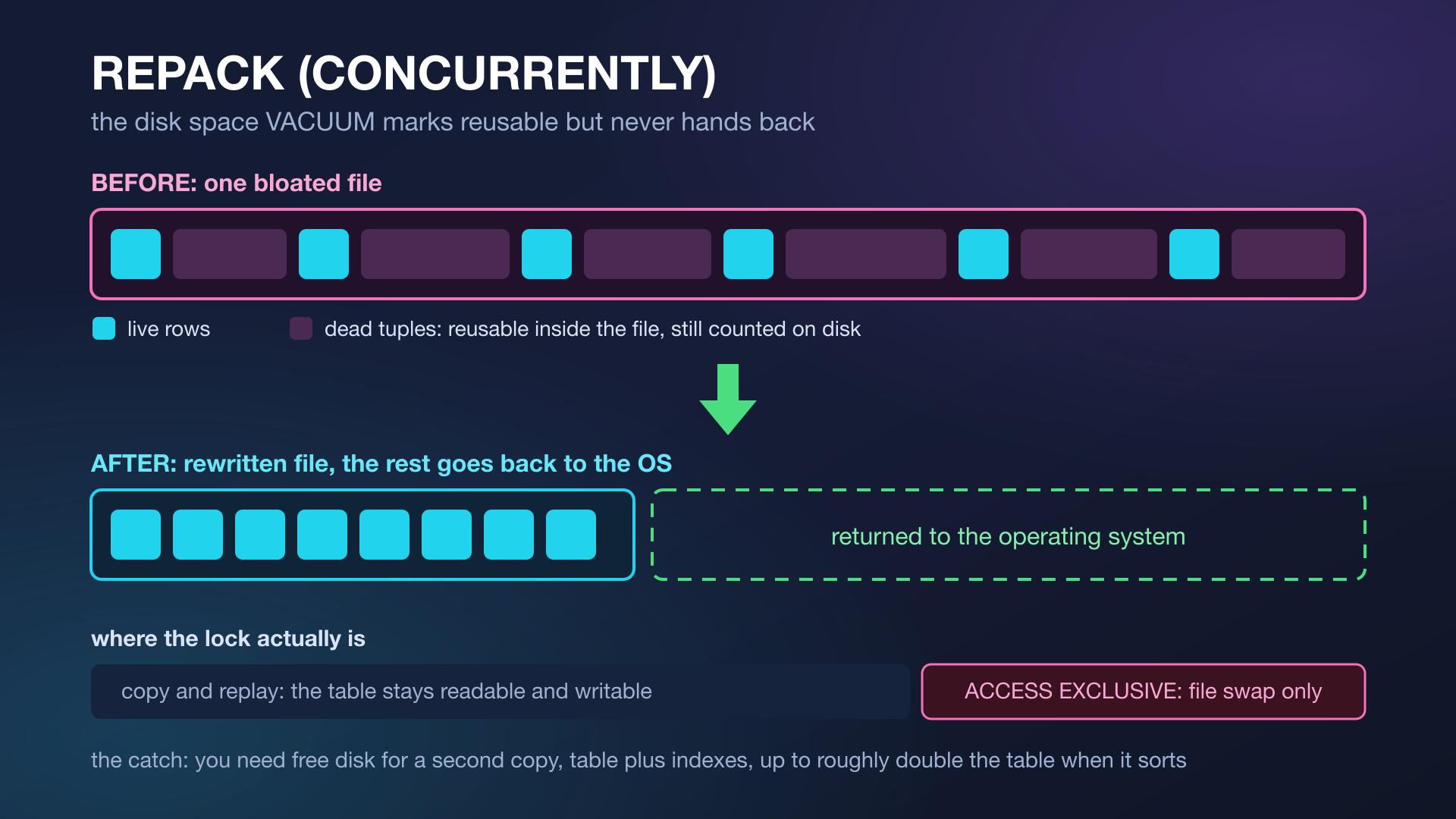
Postgres never updates a row in place. An update writes a new version and leaves the old one behind, and VACUUM only marks that dead space as reusable inside the file. Reusable is not returned, which is why a table that churns heavily keeps its size on disk long after the rows are gone, and why your monitoring shows a database that only ever grows.
Getting the space back means rewriting the table into a fresh file. VACUUM FULL has always done that, and it takes an ACCESS EXCLUSIVE lock for the entire rewrite, blocking reads and writes. On a table big enough for the bloat to matter, that is an outage, so nobody runs it and everybody installs pg_repack instead.
Postgres 19 brings the operation into core as REPACK, and it replaces both VACUUM FULL and CLUSTER.
-- Rewrite the table, hand the free space back to the OS
REPACK events;

-- Same, but physically order rows by an index, the old CLUSTER job
REPACK events USING INDEX events_occurred_at_idx;

-- Keep the table readable and writable while it happens
REPACK (CONCURRENTLY, VERBOSE) events;
Without CONCURRENTLY, the ACCESS EXCLUSIVE lock is held for the whole copy. With it, Postgres builds the new table and index files while the old ones stay in service, captures everything that changed during the copy through logical decoding, replays those changes, and only then takes the exclusive lock to swap the files. The lock is held for the swap, which should be short, instead of for the entire rewrite.
The concurrent mode uses replication slots, sized by the new max_repack_replication_slots setting, which defaults to 5 and can only be changed at server start. Worth knowing before your first attempt on a busy table, because that default caps how many concurrent repacks can run at once. Set it to 0 and the command refuses to run at all. REPACK (CONCURRENTLY) also cannot run inside a transaction block, so it has to be its own statement rather than one line in a migration script that wraps everything in a transaction.
The constraint that catches people out is disk space, because the rewrite needs room for a second copy. With an index scan or a plain sequential scan, you need at least the size of the table plus the size of all its indexes. If Postgres uses a sequential scan and sort, a temporary sort file joins the party and the peak requirement climbs to roughly double the table size plus the indexes.
To reclaim space you must first have space, and the moment you actually want REPACK is usually the moment you have the least. Reclaiming bloat is a thing to schedule while you are comfortable, not an emergency lever to pull at 94 percent full.
How to stop a good query plan from going bad with pg_plan_advice
A query has been fine for a year, nothing in the application changed, and one morning it is slow. Statistics drifted, the row estimates moved, and the planner picked a different shape. There was never a supported way to say "the plan you had yesterday was right, keep using it", which is why hint extensions exist outside core.
Postgres 19 ships pg_plan_advice for stabilizing and controlling planner decisions. Despite the name, it is not something you install with CREATE EXTENSION: it is a loadable module, so it has to reach the server through shared_preload_libraries, session_preload_libraries, or a plain LOAD in the session. Once it is loaded, the workflow is to capture the plan while it is still fast and pin it, so the planner stops re-deciding on you.
-- pg_plan_advice is a loadable module, not a CREATE EXTENSION extension
LOAD 'pg_plan_advice';

-- 1. capture the shape of the plan while it is still the fast one
EXPLAIN (COSTS OFF, PLAN_ADVICE)
SELECT * FROM join_fact f JOIN join_dim d ON f.dim_id = d.id;

-- 2. pin what came back under "Generated Plan Advice"
SET pg_plan_advice.advice = 'JOIN_ORDER(f d)';
The advice string is whatever EXPLAIN (PLAN_ADVICE) prints under Generated Plan Advice, a list of directives like JOIN_ORDER(f d) or INDEX_SCAN(...). The companion pg_stash_advice, which is a real extension you install with CREATE EXTENSION, stores that advice per query id and applies it automatically, so you can pin a plan without touching the application that sends the query.
A pinned plan will not adapt when your data genuinely changes shape, so it is a targeted fix for a known regression rather than something to spray across a workload. Pin the query that hurts, write down why, and revisit it.
Why is JIT now disabled by default?
Postgres can compile heavy queries down to machine code, and it decided whether to bother based on the planner's cost estimate. The release notes are blunt about the problem: that costing was unreliable, so JIT fired on queries that did not need it, paying compilation time for no gain. Plenty of teams had already set jit = off globally for exactly this reason.
Postgres 19 makes that default. If your workload genuinely benefits, analytical queries scanning a lot of rows with complex expressions, turn it back on deliberately and measure. That is the right way round: opt in where it pays, rather than pay everywhere and hope.
What else changed in Postgres 19?
Autovacuum can now use parallel workers, controlled by the new autovacuum_max_parallel_workers setting, which cuts the time spent vacuuming indexes on large tables. It is not free, since those workers compete for the same resources as everything else, so treat it as a dial to turn deliberately rather than a default to max out.
If you read about GROUP BY ALL landing in this release, that one did not survive the beta. It was committed, shipped in beta 1, and then reverted on July 17, 2026, because it mishandled columns that also appear in ORDER BY with non-default equality semantics, which made some queries return wrong results. The fix was judged too much churn for late beta, so the plan is to try again in Postgres 20. On beta 3, GROUP BY ALL is a syntax error, and the ALL that the grammar still accepts is the old modifier for grouping sets, which needs an explicit column list after it.
COPY TO can also emit JSON now, with FORCE_ARRAY wrapping the whole output in a single JSON array with commas between rows instead of one object per line.
COPY (SELECT id, email FROM users WHERE active)
TO '/tmp/active_users.json'
(FORMAT json, FORCE_ARRAY);
Both json and FORCE_ARRAY are COPY TO only, so this is an export path, not an import one. If you have a script dumping CSV and converting it afterwards, you can delete the conversion step.
FAQ
Does Postgres 19 replace Neo4j?
Not for workloads that need graph storage and fast deep traversal, because SQL/PGQ is a read-only view over relational tables rather than a native graph store. It does replace the reason many teams reached for a graph database, which was avoiding unreadable multi-table joins.
Do property graphs change my existing schema?
No. CREATE PROPERTY GRAPH points at tables you already have and creates no new storage. Your tables, constraints, and indexes stay exactly as they are, and dropping the graph leaves the schema untouched.
Is ON CONFLICT DO SELECT actually atomic?
Yes. It is a single statement, so the row is either inserted or selected, with no window in between. A conflict target and a RETURNING clause are both mandatory, and you can add FOR UPDATE to get the conflicting row back already locked.
Does REPACK CONCURRENTLY need extra disk space?
Yes, and this is the main thing to plan for. You need at least the table size plus the size of all its indexes free, and up to roughly double the table size plus indexes when a sequential scan and sort is used.
Can I still use pg_repack after upgrading to Postgres 19?
You can, but for an ordinary table the built-in REPACK (CONCURRENTLY) does the same job without an extension to install, upgrade, and keep compatible with each major version. Check the specific behaviors you depend on before dropping the extension entirely.
Does Postgres 19 have GROUP BY ALL?
No. It was committed and shipped in beta 1, then reverted on July 17, 2026 after a post-commit review found it returned wrong results for columns that also appear in ORDER BY. Several write-ups from the commitfest period still list it as a Postgres 19 feature. It is expected to come back in Postgres 20.
Should I turn JIT back on in Postgres 19?
Only if you measure a win. It is off by default because the planner's cost estimates for deciding when to compile were unreliable. Analytical queries over many rows with complex expressions are the case worth testing.
Postgres 19 is not a rewrite of how you use the database. It is a release that removes workarounds: the extension you installed for online table rewrites, the second query after a failed upsert, the second datastore you added because a five table join was unreadable.
Happy querying!