
Picture a ranger walking a forest trail with a phone, logging fallen trees and loose bridge planks. Half the trail has no signal. You built the app in Rails 8, you saw app/views/pwa in the generated tree, and you assumed the offline part was handled, but a fresh Rails app is installable at best, and the moment the ranger taps "Save report" in a dead zone, the form just fails.
This post walks through the parts Rails leaves to you: caching the form so it opens without a network, queueing submissions in IndexedDB, replaying them when the signal comes back, and making sure a replay never creates a duplicate record. I ran every piece in a scratch Rails 8.1.4 app and drove it with a real Chromium through Playwright, so the numbers at the end are measured.
What does Rails 8 PWA support actually give you?
The PWA files arrived in Rails 7.2, which "now generate[s] default PWA files for the manifest and service worker, which are served from app/views/pwa" according to the Rails 7.2 release notes. Rails 8 kept them. Run rails new today and you get app/views/pwa/manifest.json.erb, app/views/pwa/service-worker.js, and two commented-out routes:
# Render dynamic PWA files from app/views/pwa/* (remember to link manifest in application.html.erb)
# get "manifest" => "rails/pwa#manifest", as: :pwa_manifest
# get "service-worker" => "rails/pwa#service_worker", as: :pwa_service_worker
The manifest gives you a name, icons and "display": "standalone", which is what makes the app installable on a home screen. The generated service worker, though, contains nothing but commented-out Web Push code. It does not cache a single file, and nothing in app/javascript registers it. That gap is where the misunderstanding comes from: "Rails ships PWA support" reads like "Rails ships offline support", and those are different features.
Real offline support needs three things the generator does not write: a cache for the pages and assets the user needs without a network, a local store for data the user creates while offline, and a way to push that data to the server later without losing or doubling any of it.
How to enable the Rails PWA routes and register the service worker
Start with the trail report model. The client_uuid column matters later, so add it now, with a unique index:
class CreateTrailReports < ActiveRecord::Migration[8.1]
  def change
    create_table :trail_reports do |t|
      t.string :trail_name, null: false
      t.text :note
      t.string :client_uuid, null: false
      t.datetime :recorded_at, null: false

      t.timestamps
    end
    add_index :trail_reports, :client_uuid, unique: true
  end
end
Then uncomment the PWA routes and add the resource:
Rails.application.routes.draw do
  get "manifest" => "rails/pwa#manifest", as: :pwa_manifest
  get "service-worker" => "rails/pwa#service_worker", as: :pwa_service_worker

  resources :trail_reports, only: %i[index new create]
  root "trail_reports#new"
end
In app/views/layouts/application.html.erb the generator left the manifest tag commented out too. Change <%#= tag.link rel: "manifest" ... %> to <%= tag.link rel: "manifest" ... %>.
The service worker lives at /service-worker, at the root of the site. A worker can only control pages inside its own path, so serving it from /assets/... would limit it to that folder. Registration is a few lines in a new file, app/javascript/offline.js, pinned in config/importmap.rb with pin "offline" and imported from application.js with import "offline":
if ("serviceWorker" in navigator) {
  navigator.serviceWorker.register("/service-worker", { scope: "/" })

  // Browsers without Background Sync (Safari, Firefox) flush from here.
  const flushOutbox = async () => {
    const registration = await navigator.serviceWorker.ready
    registration.active?.postMessage("flush-outbox")
  }

  window.addEventListener("online", flushOutbox)
  flushOutbox()

  // Ask the browser not to evict IndexedDB under storage pressure.
  navigator.storage?.persist?.()
}
The flushOutbox message and the persist() call come into play further down. For now, the worker gets registered on every page load, and service workers only run in secure contexts, so you need HTTPS in production (localhost counts as secure during development).
How to cache the Rails app shell for offline use
The ranger needs to open the "New trail report" form without any network. That means the HTML of /trail_reports/new and every digested asset it loads must already be in the cache. Here is the top of app/views/pwa/service-worker.js:
const CACHE = "trail-shell-v1"
const SHELL_PAGE = "/trail_reports/new"
const OUTBOX_PATH = "/trail_reports"

self.addEventListener("install", (event) => {
  event.waitUntil(precacheShell())
  self.skipWaiting()
})

self.addEventListener("activate", (event) => {
  event.waitUntil(self.clients.claim())
})

self.addEventListener("fetch", (event) => {
  const { request } = event
  const url = new URL(request.url)
  if (url.origin !== self.location.origin) return

  if (request.method === "POST" && url.pathname === OUTBOX_PATH) {
    event.respondWith(submitOrQueue(request))
  } else if (request.method === "GET") {
    event.respondWith(networkFirst(request))
  }
})

// Cache the form page plus every digested asset it references,
// including the modules listed in the importmap.
async function precacheShell() {
  const cache = await caches.open(CACHE)
  const response = await fetch(SHELL_PAGE)
  const html = await response.clone().text()
  const assets = new Set([...html.matchAll(/"(\/assets\/[^"]+)"/g)].map((match) => match[1]))
  await cache.put(SHELL_PAGE, response)
  await cache.addAll([...assets])
}

async function networkFirst(request) {
  const cache = await caches.open(CACHE)
  try {
    const response = await fetch(request)
    if (response.ok) cache.put(request, response.clone())
    return response
  } catch (error) {
    return (await cache.match(request, { ignoreSearch: true })) || Response.error()
  }
}
In precacheShell, note that Propshaft gives every asset a digest in its file name, so you cannot hardcode /assets/application.js. Instead the worker fetches the form page during install and pulls every quoted /assets/... path out of the HTML. With importmap that catches more than <script> and <link> tags: the import map itself is a JSON block of quoted paths like "/assets/controllers/trail_report_controller-<digest>.js", so every Stimulus controller ends up in the cache too.
networkFirst handles every other GET: try the network, store successful responses, fall back to the cache when the fetch throws. Network-first is the right default for a form app whose pages change, and it also covers deploys. The worker file itself does not change when you ship new assets, so the browser has no new version to install (see the MDN guide to the service worker lifecycle), but the next online visit fetches the new form page and its new digested assets through networkFirst and stores them. Bump CACHE whenever you change the worker's own logic, so the browser installs the new version.
What happens when the connection drops mid-submit?
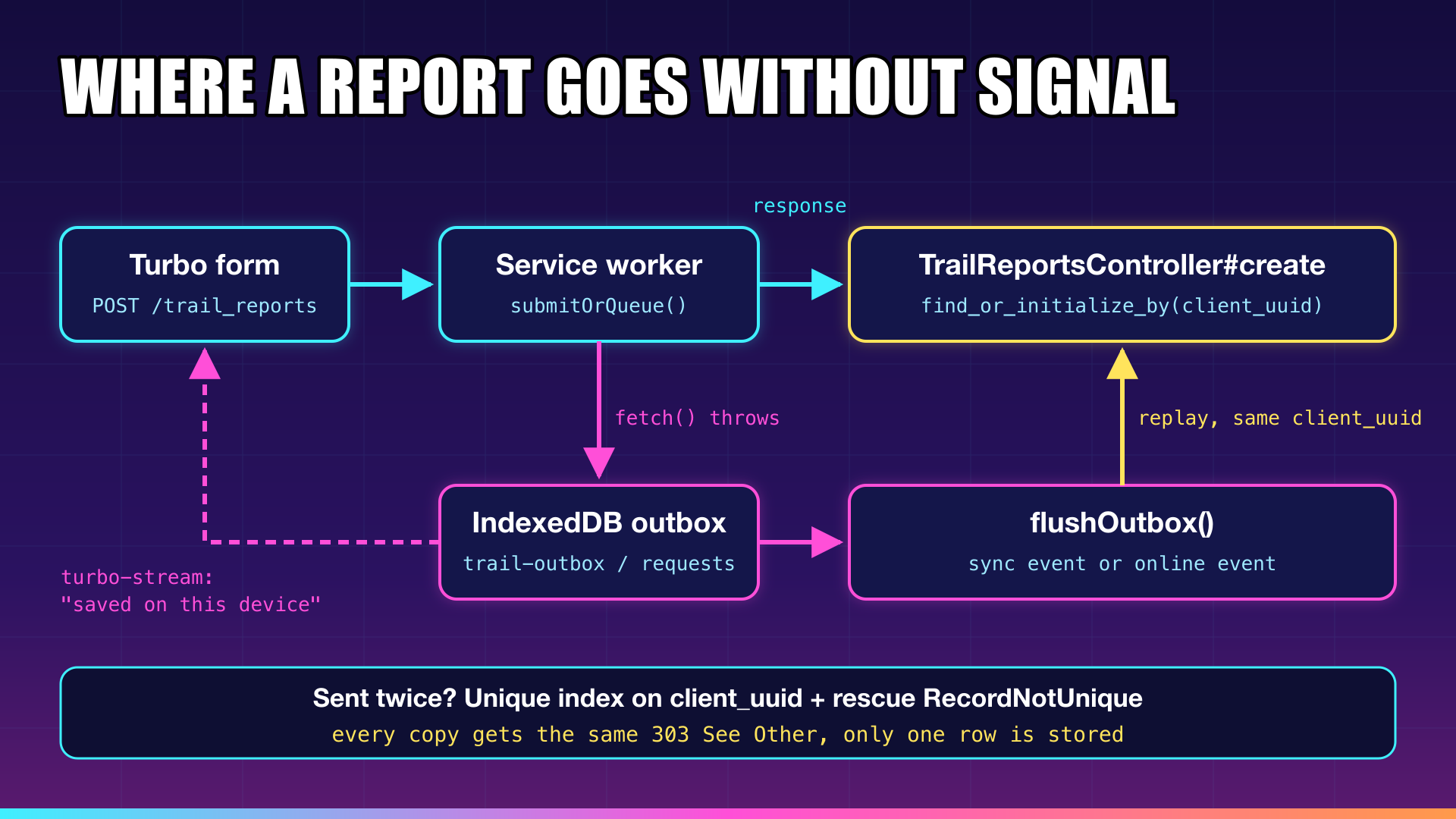
The ranger taps "Save report" at the edge of coverage. The request leaves the phone and the server receives it, writes the row and sends back a redirect, but the response never makes it back over the dying connection. On the phone, fetch() rejects with a network error, exactly as if the request had never left.
From the client's point of view, those two situations look identical. No response means "maybe stored, maybe not". The only safe reaction is to keep the report and send it again later, which means the server must be ready to receive the same report twice. If your create action calls TrailReport.create and nothing else, the second delivery is a second row: two fallen spruces at kilometer 4 where there is one.
The fix is an idempotency key: an identifier the client attaches to the report once and keeps across every retry. That is what the client_uuid column is for.
How to make Turbo form submissions idempotent in Rails
The controller looks the report up by its key before creating anything:
class TrailReportsController < ApplicationController
  def index
    @trail_reports = TrailReport.order(recorded_at: :desc)
  end

  def new
    @trail_report = TrailReport.new
  end

  def create
    @trail_report = TrailReport.find_or_initialize_by(client_uuid: trail_report_params[:client_uuid])

    # A replayed request for a report we already stored: answer like the first time.
    return redirect_to(trail_reports_path, status: :see_other) if @trail_report.persisted?

    if @trail_report.update(trail_report_params)
      redirect_to trail_reports_path, status: :see_other
    else
      render :new, status: :unprocessable_content
    end
  rescue ActiveRecord::RecordNotUnique
    # Two copies of the same report raced each other; the other one won.
    redirect_to trail_reports_path, status: :see_other
  end

  private

  def trail_report_params
    params.expect(trail_report: %i[trail_name note client_uuid recorded_at])
  end
end
Two layers do the work. find_or_initialize_by catches the common case, a retry that arrives after the first copy has been stored, and answers it with the same 303 See Other the first request got. The unique index catches the race where two copies arrive at the same moment and both pass the lookup. The loser hits ActiveRecord::RecordNotUnique, and the rescue turns that into the same redirect instead of a 500. Without the rescue, the duplicate would get a 500, the client would treat it as a server error and keep retrying a report that is already safely stored.
After a form submission Turbo Drive "expects the server to return an HTTP 303 redirect response", per the Turbo handbook, and 422 is the status for validation errors, which is why the failure branch renders :new with :unprocessable_content.
To check the replay behavior, you can send the same payload twice through an integration session in bin/rails runner:
# Simulates "the request reached the server, the response never reached the phone":
# the same report is posted twice with the same client_uuid.
ActionController::Base.allow_forgery_protection = false
session = ActionDispatch::Integration::Session.new(Rails.application)
session.host! "localhost"

payload = {
  trail_report: {
    trail_name: "Ridge Loop",
    note: "Fallen spruce across the path at km 4",
    client_uuid: "7f9c2b1e-4d3a-4f8e-9b6a-2c1d0e5f7a88",
    recorded_at: "2026-10-12T08:15:00Z"
  }
}

2.times do
  session.post "/trail_reports", params: payload
  puts session.response.status
end
Rails.application.executor.wrap { puts TrailReport.where(client_uuid: payload[:trail_report][:client_uuid]).count }

# Output:
# 303
# 303
# 1
Why the idempotency key must come from the device
The obvious place to create the UUID is the view, something like form.hidden_field :client_uuid, value: SecureRandom.uuid. That works while you are online. Offline, the form page comes out of the service worker cache, which holds one rendered copy of the HTML, so by construction every form opened offline carries the same UUID. The first queued report goes through when the signal returns, and every later one hits find_or_initialize_by, gets a 303 and is thrown away, so the server discards real reports as duplicates.
So the key has to be generated on the device, every time a form is shown and every time one is submitted. A small Stimulus controller does it:
import { Controller } from "@hotwired/stimulus"

// Gives every report its own identity on the device, even when the
// page itself came out of the service worker cache.
export default class extends Controller {
  static targets = ["uuid", "recordedAt"]

  connect() {
    this.stamp()
    this.element.addEventListener("turbo:submit-end", this.submitted)
  }

  disconnect() {
    this.element.removeEventListener("turbo:submit-end", this.submitted)
  }

  submitted = (event) => {
    if (!event.detail.success) return
    this.element.reset()
    this.stamp()
  }

  stamp() {
    this.uuidTarget.value = crypto.randomUUID()
    this.recordedAtTarget.value = new Date().toISOString()
  }
}
stamp() runs on connect and again after every successful submission, so a ranger logging three problems in a row without signal gets three different keys. The second call is needed because form.reset() clears the visible fields but leaves hidden inputs alone, because for a hidden input, setting .value also changes its default value (see the HTML spec on hidden inputs). Without the extra stamp(), the next report would reuse the previous key. recorded_at comes from the device for the same reason: a report queued at 8:15 and delivered at 11:40 should say 8:15. Note that crypto.randomUUID() is only available in secure contexts, which you already need for the service worker anyway.
The form wires the controller to the two hidden fields and adds an empty element for status messages:
<h1>New trail report</h1>
<div id="submission_status"></div>

<%= form_with model: @trail_report, data: { controller: "trail-report" } do |form| %>
  <%= form.hidden_field :client_uuid, data: { trail_report_target: "uuid" } %>
  <%= form.hidden_field :recorded_at, data: { trail_report_target: "recordedAt" } %>
  <%= form.label :trail_name %>
  <%= form.text_field :trail_name, required: true %>
  <%= form.label :note %>
  <%= form.text_area :note %>
  <%= form.submit "Save report" %>
<% end %>
How to queue failed form submissions in IndexedDB
Back in the service worker, the fetch handler already sends POST /trail_reports to submitOrQueue. This function tries the network, and when there is no response it saves the raw request in IndexedDB and answers the page itself:
async function submitOrQueue(request) {
  // Read the body before fetch() consumes it.
  const body = await request.clone().arrayBuffer()
  try {
    return await fetch(request)
  } catch (error) {
    // No response at all. The server may or may not have stored the report.
    await enqueue({
      url: request.url,
      body,
      contentType: request.headers.get("Content-Type"),
      queuedAt: Date.now()
    })
    await self.registration.sync?.register("flush-outbox").catch(() => {})
    return queuedResponse()
  }
}

function queuedResponse() {
  const stream = `<turbo-stream action="update" target="submission_status"><template>
    <p class="queued">No signal. The report is saved on this device and will be sent automatically.</p>
  </template></turbo-stream>`
  return new Response(stream, { headers: { "Content-Type": "text/vnd.turbo-stream.html" } })
}
Storing the body as raw bytes, together with its original Content-Type, keeps the worker ignorant of what is inside. Whatever Turbo encoded, including the authenticity_token field Rails put in the form, gets replayed byte for byte, and Rails parses it exactly as it would have the first time. The clone() matters because a request body can be read only once, and fetch(request) is about to read it.
The answer to the page is a Turbo Stream. When a form is submitted with POST, PUT, PATCH or DELETE, "Turbo injects text/vnd.turbo-stream.html into the set of response formats in the request's Accept header", and it "knows to automatically attach <turbo-stream> elements when they arrive in response to <form> submissions", per the Turbo Streams handbook. So the worker can respond as if it were the server: the status message appears in #submission_status, turbo:submit-end fires with success: true, and the Stimulus controller resets the form with a fresh UUID. The ranger sees "saved on this device" and moves on to the next fallen tree.
The IndexedDB layer is plain browser API:
function openOutbox() {
  return new Promise((resolve, reject) => {
    const open = indexedDB.open("trail-outbox", 1)
    open.onupgradeneeded = () => open.result.createObjectStore("requests", { keyPath: "id", autoIncrement: true })
    open.onsuccess = () => resolve(open.result)
    open.onerror = () => reject(open.error)
  })
}

async function withStore(mode, operation) {
  const db = await openOutbox()
  return new Promise((resolve, reject) => {
    const transaction = db.transaction("requests", mode)
    const request = operation(transaction.objectStore("requests"))
    transaction.oncomplete = () => resolve(request.result)
    transaction.onerror = () => reject(transaction.error)
  })
}

const enqueue = (entry) => withStore("readwrite", (store) => store.add(entry))
const allQueued = () => withStore("readonly", (store) => store.getAll())
const dequeue = (id) => withStore("readwrite", (store) => store.delete(id))
const markFailed = (entry, status) => withStore("readwrite", (store) => store.put({ ...entry, failedWith: status }))
withStore resolves on the transaction's oncomplete, not on the request's onsuccess. A write is durable only once its transaction commits, and you do not want to tell the ranger the report is safe one moment before it actually is.
How to send the queue when the signal comes back
Two triggers flush the outbox. The first is the Background Sync API: submitOrQueue registers a flush-outbox sync tag, and the browser fires a sync event in the worker once it has connectivity again, even if the ranger has closed the tab. Support is limited: per caniuse, Background Sync works in Chrome, Edge, Chrome for Android and Samsung Internet, and not at all in Firefox or Safari, including Safari on iOS. If your rangers carry iPhones, Background Sync will never fire for them. That is why the registration call is wrapped in ?. and .catch(): on a browser without it, the call does nothing.
The second trigger covers everyone else. offline.js posts a flush-outbox message to the worker on every page load and on the window's online event. The worker handles both triggers the same way:
self.addEventListener("sync", (event) => {
  if (event.tag === "flush-outbox") event.waitUntil(flushOutbox())
})

self.addEventListener("message", (event) => {
  if (event.data === "flush-outbox") event.waitUntil(flushOutbox())
})

async function flushOutbox() {
  const pending = (await allQueued()).filter((entry) => !entry.failedWith)
  for (const entry of pending) {
    const response = await fetch(entry.url, {
      method: "POST",
      body: entry.body,
      headers: { "Content-Type": entry.contentType, Accept: "text/html" },
      credentials: "same-origin"
    })
    // create redirects to the index on success; landing anywhere else
    // (a login page, for example) means the report was not stored.
    const stored = response.ok && new URL(response.url).pathname === OUTBOX_PATH
    if (stored) {
      await dequeue(entry.id)
    } else if (response.status < 500) {
      // A 4xx or a detour will not fix itself on retry. Keep the data, stop resending it.
      await markFailed(entry, response.status)
    }
  }
}
The replay asks for plain HTML, so the server's 303 redirect is followed to /trail_reports, which answers 200. The worker counts a report as stored only when the final URL is that index page, not merely when response.ok is true, because a replay from an expired session can end on a login page that also answers 200. If the network is still down, fetch throws, the loop stops, and the sync event's promise rejects, which tells Chromium to retry later. A 5xx leaves the entry in place for the next flush. A 4xx is different: a validation error or an expired CSRF token will fail the same way on every retry, so the entry is marked and skipped instead of deleted. The data stays on the device, where you can show it to the ranger instead of losing it silently. A queued request also depends on the session that created it. If your logout calls reset_session, the stored authenticity_token stops matching and Rails answers 422. The Rails 8 authentication generator behaves differently: its terminate_session destroys the session record and deletes the cookie, so a replay after logout is redirected to new_session_path, the login page answers 200, and a check based on response.ok alone would delete a report that was never stored. Checking where the redirect landed catches both cases.
Two triggers also mean the same entry can be sent twice at the same moment, for example when the online event and the sync event fire close together. You could add locking to the worker. You do not need to, because the server already treats a second copy as a no-op.
Will Safari delete IndexedDB data in an offline PWA?
It can, and you should design around it. IndexedDB storage is "best-effort" by default, and under storage pressure browsers evict whole origins with a least-recently-used policy, as the MDN page on storage quotas and eviction explains. Calling navigator.storage.persist() asks the browser to exempt your origin from that eviction. Firefox shows the user a prompt, while Safari and Chromium browsers grant or deny it silently based on how much the user has interacted with the site, so the browser may still refuse the call in offline.js.
Safari adds a second rule. With tracking prevention on, if an origin sees no user interaction "in the last seven days of browser use, its data created from script will be deleted", per the same MDN page. According to WebKit's announcement of the policy, that covers IndexedDB, the Cache Storage your service worker fills, and the service worker registration itself. A ranger who opens your site in Safari, queues reports, and comes back two weeks later may find the queue gone. Home screen installs fare better: the same announcement says "web applications added to the home screen are not part of Safari and thus have their own counter of days of use", which resets as the app is actually used. In practice, tell iPhone users to add the app to the home screen, and drain the queue at every chance you get rather than letting reports sit for days.
When is a PWA the wrong tool for offline Rails?
The outbox above fits apps where the offline part is small: a handful of forms and the data the user creates in the field. It gets harder when the user needs to browse large datasets offline, because then you are mirroring part of your database into IndexedDB and writing sync logic in both directions, including conflicts when two people edit the same record. It also gets harder when data loss is unacceptable on iOS, since Safari's eviction rules are outside your control. In those cases, a native shell with real on-device storage is the better fit, even though it costs more to build.
Checklist: Rails 8 PWA with an offline outbox
- Uncomment the
pwa_manifestandpwa_service_workerroutes and the manifest<link>tag. - Register
/service-workerwith scope/from an importmap-pinned file. - Precache the form page and every
/assets/...path it references duringinstall. - Add a
client_uuidcolumn with a unique index and look it up increatebefore writing. - Rescue
ActiveRecord::RecordNotUniqueinto the same 303 the first request gets. - Generate the UUID and the timestamp on the device, after every
form.reset(). - Queue failed POST bodies and their
Content-Typein IndexedDB and answer with a Turbo Stream. - Flush on
syncwhere supported and on page load and theonlineevent everywhere else, and treat a replay as stored only when it lands on the index page. - Call
navigator.storage.persist()and ask iPhone users to install the app to the home screen. - Test with a real outage, not only
setOffline.
FAQ
Does a Rails 8 PWA work offline out of the box?
No. Rails generates a manifest, which makes the app installable, and a service worker file that contains only commented-out push notification code. Nothing is cached and nothing registers the worker until you write that code yourself.
Does Background Sync work on iPhone?
No. Safari on iOS does not support the Background Sync API, so queued data has to be sent from the page, on load or on the online event, while the app is open.
Can I store photos in the IndexedDB outbox?
IndexedDB stores binary data, and the worker saves the request body as raw bytes, so a multipart form with a file field is stored the same way as text fields. I only tested text fields, though, and photos fill the origin's storage quota much faster, which makes navigator.storage.persist() and quick draining more important.
Do I need a JavaScript framework for offline Rails forms?
No. The setup here uses Turbo, one Stimulus controller and a service worker written in plain JavaScript. A full single-page app is worth it only when users need to browse and edit large amounts of data offline.
Happy syncing!